
Every supplier's price, order, and contact in one record.

Orders and prices for every supplier.

A product can carry a different price from every supplier who sells it, each with its own cost and tax rate. That same supplier's own record holds every order you've raised with them, from PO number to status.

From £42.50/month · Nothing charged for 30 days · Cancel anytime
L

Built by a WooCommerce operator who needed it themselves.

Read the brand story

SUPPLIER RECORDS

Every supplier's contact, pricing, and order history together.

However a supplier joins, every order treats them the same. Their price fills the line; email is the recipient.

01

Link every supplier that actually stocks this product.

Every new supplier link is set the moment you add it, not chased down later. Tax prefills from the store default; cost stays blank until you enter what that supplier charges. Each new link starts independent of whatever the other suppliers on this product are already charging, ready for its own price.

02

A long product list joins one supplier in a single pass.

One column is all a file needs to carry to start a batch: the store SKU already used on the product. Cost and tax rate are optional additions, matched against products already in the store. A downloadable template shows that exact format before a single row is typed.

03

Every purchase order for this supplier, in one place.

Total spend with this supplier sits as one running column, order by order. Grand Total runs down the Purchase Order History card for every purchase order raised with this supplier. Narrow it by range and the spend for any slice of orders stands on its own.

04

One place holds who every purchase order goes to.

Who receives a purchase order is settled on the supplier record, once, not chosen again each time one goes out. Supplier Email becomes the To address automatically, pulled from that same record every time an order is sent. The same record carries a CC Emails line, one comma-separated list that splits into CC recipients the moment the order goes out.

05

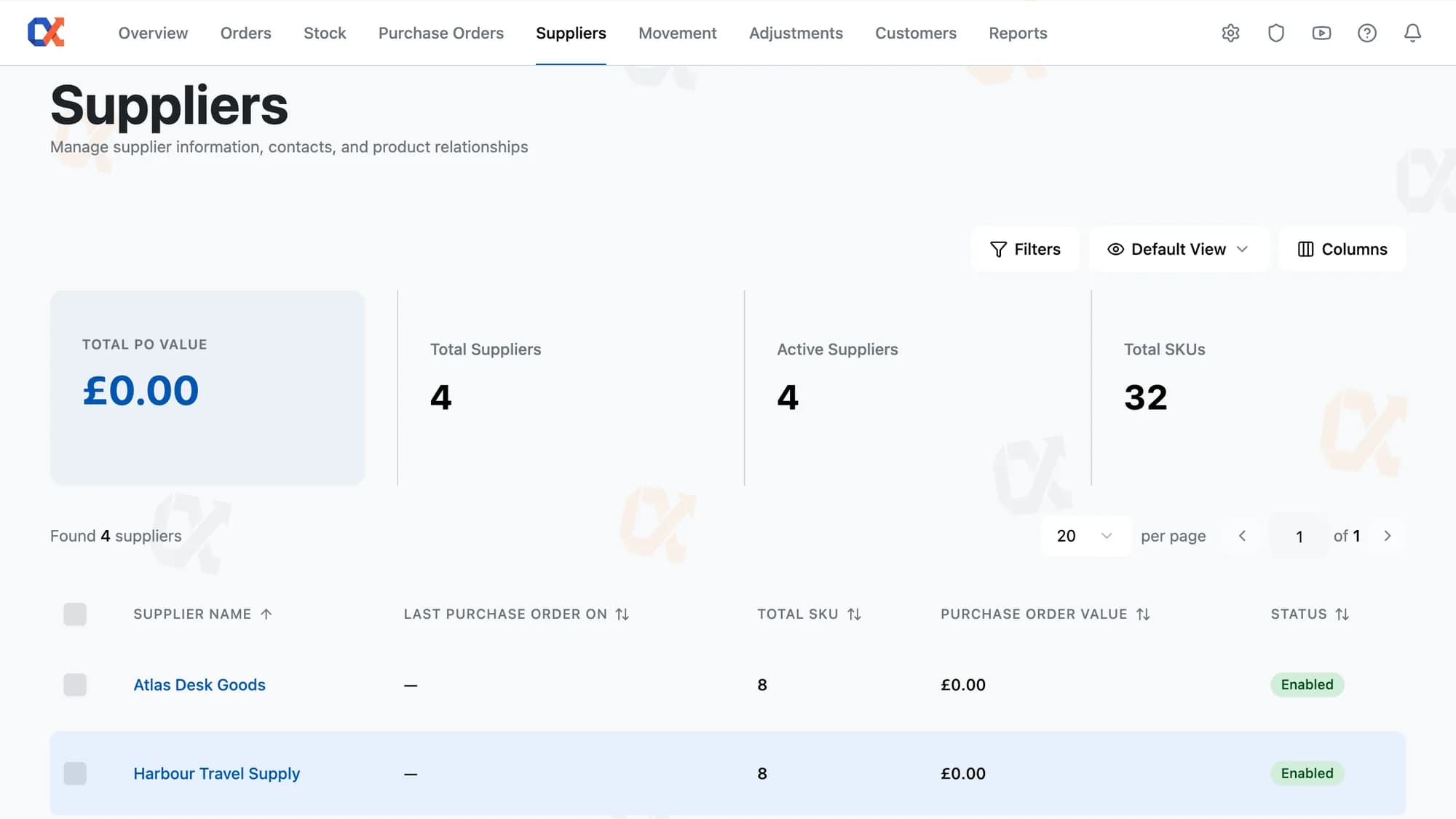
The entire supplier base on one screen, one row each.

Reading a supplier's line means reading all five facts at once, not assembling them from separate places. Supplier name, last purchase order on, total SKU, purchase order value, and status sit together on that one line for every active supplier. Last purchase order on and purchase order value both reflect completed orders.

SUPPLIER TO ORDER

From a blank record to a priced purchase order.

Only the ordering step repeats, while setting up the supplier happens just the once.

How little a new supplier record needs to start.

Press Add Supplier and enter a name and an email, the only two fields required. Contact person, phone, website, and CC emails stay optional at this stage. Saving it opens the new supplier's page, with the Products and Purchase Order History cards ready to use.

EVERYDAY HANDLING

The full depth of running a supplier base.

Every supplier edit saved as one

Save confirmation covers contact, address, and product edits, all landing together instead of in parts.

One entry sets the cost

Default cost belongs to the product, not the supplier, and starts from whichever price is entered first.

Past purchase orders survive supplier deletion

Purchase orders already past pending keep their own record when a supplier is deleted.

Edit supplier pricing anywhere you work

Product and variation-level supplier costs stay reachable from the product editor, not just the supplier page.

Eligible rows counted before acting

Ticking suppliers surfaces a count in the More menu showing which rows Enable or Disable can reach.

A summary for the suppliers shown

Spend, supplier, and SKU totals update to match the filter applied to the list.

MULTI-SUPPLIER PRICING

One product, every supplier's price, side by side.

Three suppliers on one product means three different prices, each one exactly what that supplier actually charges. The cheapest supplier and the priciest one each keep their own figure. The gap between them sits right there on the page, a number instead of a guess. That gap holds even if a fourth or fifth supplier joins the same product.

On the product editor's Inventory Alpha tab, every supplier linked to that product sits in one list, cost and tax entered against their name. Each row edits on its own, so raising one supplier's price by a pound leaves the others untouched. Each linked supplier becomes its own row, with its own cost and tax rate, all visible together. That list is where the difference actually lives.

HOW IT COMPARES

How Suppliers compares

What a supplier record holds here, versus the contact list and price sheet you keep separately today.

Capability
Default
WooCommerce
ATUM
Inventory
Shelf
Planner
Inventory Alpha
Supplier record with contact and address
Per-supplier cost and tax on each product
One product priced by several suppliers
Variation-level supplier price override
Supplier cost prefills purchase-order lines
Order history on the supplier record
Spend and last order date per supplier
Bulk-link products to a supplier by CSV
Full support Partial / workarounds Not supported

WORKS WITH YOUR STACK

Drops into your existing WordPress site.

No data migration, no separate dashboard. Inventory Alpha installs as a standard plugin and reads your existing WooCommerce orders and products.

WordPress
6.0 +
WooCommerce
7.0 +
PHP
8.0 +
Amazon
Marketplace channel
eBay
Marketplace channel
In-Store POS
Manual + integrations
Installs in 5 minutesReads your existing dataNo migration requiredZero downtime

FAQ

Suppliers, answered.

No. A purchase order keeps the line cost it was added at, whether it has already been received or is still pending. Purchase orders raised after the edit prefill their Purchase Cost and Tax from the new figure. Only the current price is kept against the supplier, with no record of what it was before or when it changed.

Deleting a supplier removes its pending purchase orders, along with the costs it carried against each product. Purchase orders already at processing, completed, or cancelled keep their status and stay in the order history. Re-enabling the supplier brings back only the record: the Products card opens empty, and neither the costs nor the removed orders come back.

Yes. In the Variations tab a variation can carry its own supplier cost and tax in place of the parent's. The override is per variation rather than per supplier: give one variation its own price for a single supplier and the parent's other suppliers stop listing against it, even ones that were never repriced. The parent tab's Reset All Variations to Parent Defaults button puts every variation back.

A SKU that is not in the store gets the status SKU not found in the preview table, with a dash in the Product column and the row's real line number from the file. Every row is listed that way before anything imports. Only the rows reading Ready are added, and one bad SKU never stops the rest of the file.

No. The CSV import adds products to a supplier that already exists; it does not create supplier records. Suppliers are added one at a time with the Add Supplier button, entering a Supplier Name and Supplier Email. Once a supplier exists, Import Products from CSV on its own page bulk-links its products by SKU.

Have a question we didn't cover? Contact our team →

Start free

One record holds pricing, orders, and history.

Add the suppliers you already buy from, link their products with the prices you already pay, and the next purchase order goes out priced and addressed on its own.

Not charged for 30 daysCancel anytime5‑minute setup