
INVENTORY MOVEMENT
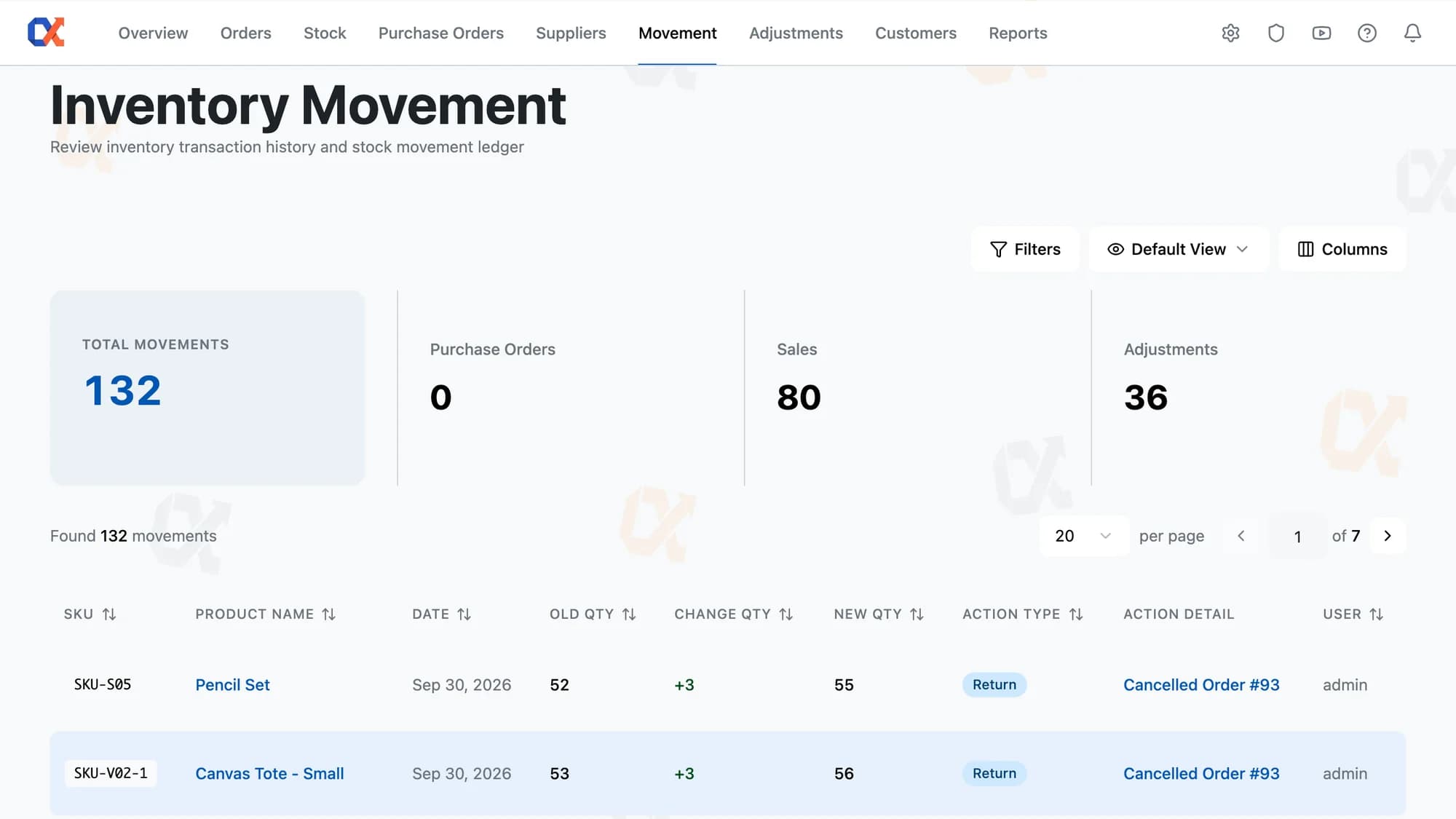
A discrepancy being a mistake or a deliberate change reads straight from the row that recorded it. Each entry shows the old quantity, the change, the new quantity, the action that caused it, and the user behind it.
THE STOCK LEDGER
Settle any question about a stock number from the row that caused it, however old.
An audit trail is only worth having if it cannot be tidied up afterwards. No one edits a movement here. The record of what happened is the record that stays. Look back at any stock figure, at any point, and what caused it is still sitting where it was written.
Stock numbers move for all sorts of reasons, and the reasons normally live wherever they happened. Here they are all in the same list, newest first. Pick any product, any week, and the changes that made its number are sitting in one place in the order they landed.
An edit made somewhere else usually leaves no trace in the store's own records. Here it writes a row like anything else, saying what made the change and who was signed in at the time. Once it is written, it cannot be altered by anyone.
Knowing what changed is half the answer. The link on the row is the other half. The detail text on every row opens the record that produced the change, and the product name opens the product record. Neither one needs a reference number copied out first.
Deleting a product removes it from the store and leaves the record alone. Every row it produced stays in the ledger, still carrying the name and SKU it was recorded under. Trading history does not thin out because a range was retired.
FROM QUESTION TO CAUSE
Three moves from a wrong-looking number to the document that explains it. Open, narrow, click.
Open Movement from the navigation and the ledger loads newest first, with a count of how many movements are on record. Every entry appears on its own, from purchase orders, sales, refunds, cancellations, adjustments, and stock edits made elsewhere.
Click Filters and type a SKU or a product name. Narrow further by date, by action type, by a quantity range, or by the user behind the change. Nine fields combine on one Apply, and the table narrows to match.
Read the row: what the stock was, what moved it, what it became, why, and who. Click the Action Detail link to open the purchase order, sale, or adjustment that caused it. The reference on the row matches the one on the document.
EVERY ROW, ACCOUNTED FOR
Green with a plus marks stock coming in, red marks stock going out.
The Action Type column names the cause: a purchase order, a sale, a return, an adjustment.
The Filters panel expands in place, holding several fields until Apply is pressed.
Total Movements, Purchase Orders, Sales, and Adjustments, recalculated the moment a filter is applied.
The reference stops being a link and turns grey, while the quantities and date stay.
A variation with a blank SKU field is found through the SKU its parent carries.
THE RECORD KEEPS ITSELF
A stock log usually needs somebody keeping it honest, and it drifts the week that person is busy. Inventory Movement has no such job to hand out. There is no rule about who is allowed to correct it, no habit for a new starter to learn, and nothing to review at month end. Nobody here is in a position to make the list wrong.
There is one permission for Inventory Movement in Roles and Permissions, and it is View. No Manage permission exists to grant at any role level, and an administrator has no more access to the ledger than a picker does. Rows arrive from what happens elsewhere in the store, never from the page itself. Correcting a figure means making another stock change, which writes its own row.
HOW IT COMPARES
Every change, who made it, and what it was before — none of it editable afterwards.
| Capability | Default WooCommerce | ATUM Inventory | Shelf Planner | Inventory Alpha |
|---|---|---|---|---|
| Every stock change logged automatically | – | – | ||
| Old, new, and changed quantity per row | – | – | ||
| The login behind every stock change | – | – | ||
| Stock edits made outside the plugin logged | – | – | – | |
| Each row links to the document behind it | – | – | ||
| No one can edit or delete a logged row | – | – | – | |
| Deleted products keep their movement rows | – | – | – | |
| Filter the log by product, date, or user | – | – | – |
WORKS WITH YOUR STACK
No data migration, no separate dashboard. Inventory Alpha installs as a standard plugin and reads your existing WooCommerce orders and products.
FAQ
The movement log itself has no add, edit, or delete control, on any role. Corrections happen through a stock adjustment, which adds a new row rather than altering the old one. That row carries the old quantity, the change, and the new quantity, tagged as an Adjustment and linked back to its source. Both rows remain in the log, newest first, the mistake and the fix side by side.
No. There is no warehouse, location, or bin anywhere in Inventory Alpha, and no stock-transfer movement type. A movement row records a product and a quantity, never a place. Instead, Inventory Alpha tracks one stock figure per product, the same figure WooCommerce sells from.
Yes. Open Movement, open the Filters panel, and type the product's SKU or name. Every change to that product comes back in one list, newest first: purchase orders received, sales, returns, adjustments, and stock edits made outside Inventory Alpha.
An outside change gets its own row, with the old quantity, the change, and the new quantity in the same three columns every movement uses. The Action Type badge reads Manual, and the Action Detail text names how the change was made: an app writing through the REST API, a scheduled job, a command line, or a direct database edit. The User column names the WordPress login of whoever was signed in, or shows system when no one was.
No. Recording a movement sends nothing, no notification, no email, no alert. The ledger is a place you check, not one that reaches out. Nine filters and saved views keep that check to one click each week.
Yes. The toolbar menu on the ledger offers Save current view, which stores the filters, hidden columns, and sort together under a name you choose. Once saved, the toolbar shows that name in place of Default View, and selecting it puts all three back at once. The view lives in your own browser, not shared with anyone else on the store.
Have a question we didn't cover? Contact our team →
Start free
Receive a purchase order, ship a few sales, correct a count. By the end of the week the ledger explains every stock figure in the store.
Not charged for 30 daysCancel anytime5‑minute setup
The rest of the toolkit
Reorder levels, costs, bulk edit
Low stock → ordered → received
Spend, AOV, and churn risk
The whole business on one screen
Who you buy from, at what cost
Correct stock by hand, logged
None, View, or Full per page
Drag-and-drop report builder
Profit per order, pick and pack