

Identify a customer's anchor product before offering a restock or bundle. Pair it with the customer's average order value to size the restock, and lifetime value to judge whether a larger bundle is worth the discount.
Four aggregate numbers above the directory, seven KPIs inside each card, one risk label on every profile.
Catch a lapsing customer with an offer sized to their own history. Churn Risk tells you the window is closing. Top Product tells you the SKU that has kept them coming back. Avg Order Value tells you the spend they are comfortable with. Put those three together and the bundle writes itself.
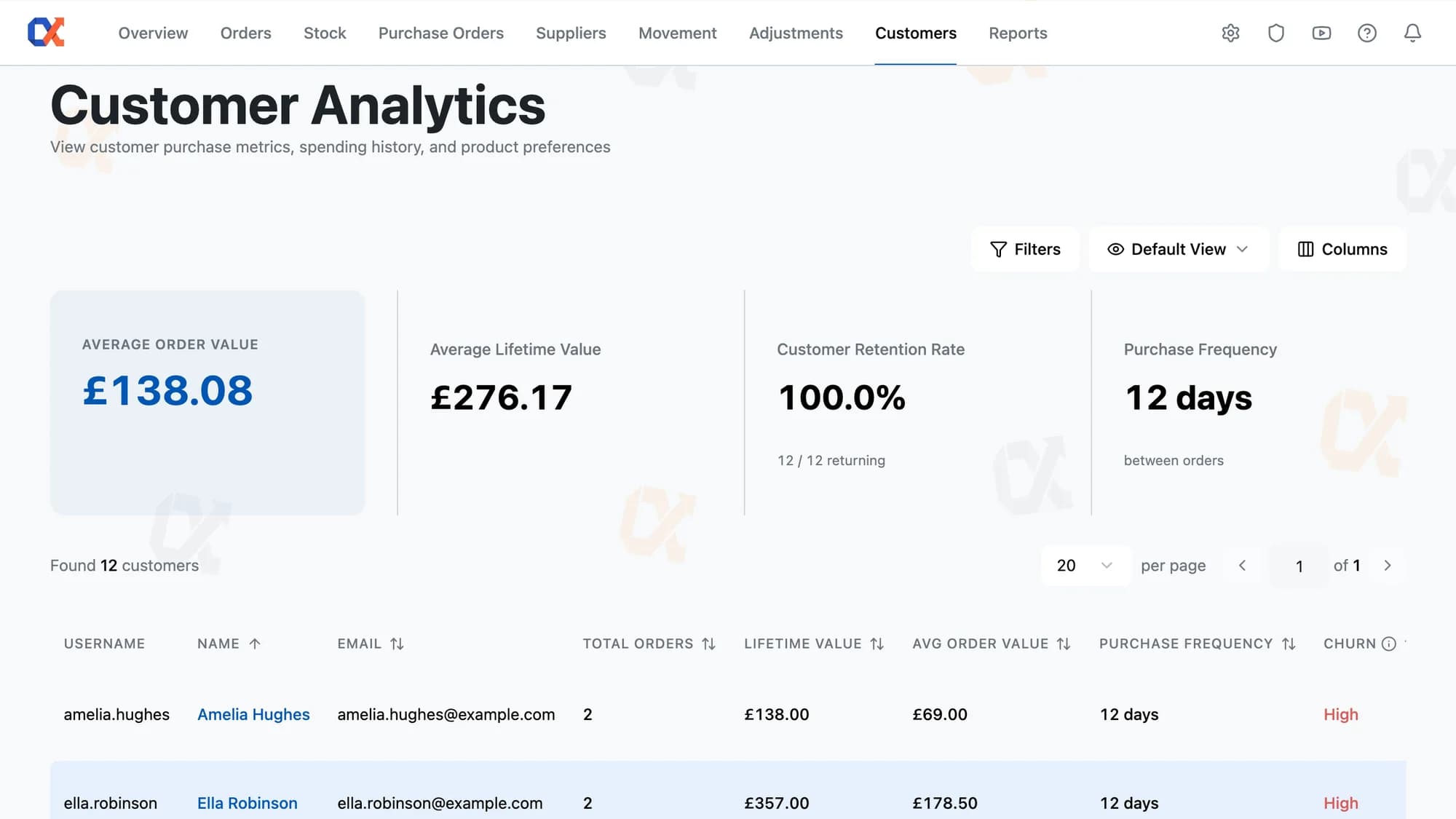
Benchmark the store before drilling into any one person. Average order value and lifetime value sit alongside customer retention rate and purchase frequency as store-wide aggregates, giving the operator a clean read on the business before individual profiles add noise. One glance and the shape of the customer base is clear.
The label tells an operator whether a customer needs attention now or is simply between orders as normal. Inventory Alpha derives each score from that buyer's own purchase frequency, so the cadence is personal rather than a blanket cutoff. Low, Medium, High, or Unknown. Four states, one per profile, nothing to configure.
Spot whether a customer's product mix shifted over the last quarter, or the last year. Filter the bar chart to any window and the rankings redraw around that period. The chart surfaces the top 10 by quantity; the CSV export hands you the full list, ranked, with SKU and product name. Concrete demand data, not a hunch.
Rank every customer by Lifetime Value, then flip to Total Orders, Avg Order Value, or Purchase Frequency without leaving the page. Each column header sorts the full directory in one click. A customer with high LTV but low purchase frequency reads differently from one with high frequency but low AOV. All four signals sit side by side, so the comparison is instant.
Inventory Alpha structures order fulfillment as a deliberate three-phase process. Everything you select in Phase 1 flows through Phases 2 and 3 — a single batch from click to shipped box.
Open the Customer Analytics menu in Inventory Alpha to land on the directory. Every WooCommerce customer loads in a sortable list, with Total Orders, Lifetime Value, Avg Order Value, and Purchase Frequency visible per row, plus four aggregate KPI cards across the top.
Know whether a customer buys monthly, weekly, or rarely, based on their average days between completed orders.
Choose any of seven preset windows or a custom calendar range to scope every purchasing metric at once.
Click any order ID to open the native WooCommerce edit screen without re-finding the order.
Updating contact details takes one click to the native WordPress user-edit screen from the customer profile.
Identify the one product each customer buys more than any other, recalculated as the date window moves.
See every order a customer has placed, across all statuses, in a single table.
The Purchasing Metrics card gives every customer profile a complete commercial portrait. Total Orders counts how many times that customer has bought from you, while LTV accumulates their full spend across every one of those orders, so you see both breadth and weight in a single glance. Average Order Value reveals the per-transaction mean, letting you spot customers who buy often but spend little versus those whose infrequent orders carry serious value. Purchase Frequency shows the average gap between that customer's own orders, which tells you whether they are a weekly re-buyer or an occasional visitor. Last Purchased anchors everything to a date, and Churn Risk translates the gap since that date into a plain categorical verdict, Low, Medium, High, or Unknown, calibrated to that specific customer's own buying rhythm. Top Product completes the picture by naming the single item they have bought in the greatest quantity, pointing directly at the relationship your fulfilment team should know about.
All seven figures respond to the same date-range selector, so the portrait you see is always scoped to the period you choose. Seven presets cover the most common windows: All Time, Last 7 days, Last 30 days, Last 90 days, This month, Last month, and This year. A Custom range option opens a two-month calendar in range-select mode; once you set a start and end date and hit Apply, every KPI on the card recalculates together against that window. The result is that you can shift from an all-time view to the last quarter in one click and immediately see how Total Orders, LTV, Frequency, and Churn Risk all move, without touching any other filter on the page.
No data migration, no separate dashboard. Inventory Alpha installs as a standard plugin and reads your existing WooCommerce orders and products.
Start free
Know which customers are growing, at risk, or stalled. Every profile and order, already waiting.