


Know the stock position, run rate, and order proposal for every variation without configuring a view first. The Variation Sheet reads a product's attribute count and selects the right layout, from a flat list for simple products to a filtered matrix for three-attribute ones, so the figures are already arranged the moment the page opens.
Managing stock used to mean juggling separate tabs for variants, suppliers, and reorder levels. Inventory Alpha puts costs, stock limits, supplier links, and low-stock signals in one editor that adapts to whatever products you sell.
A flat list works for a simple product with one variable. For a product with three attributes, Inventory Alpha opens a 2D matrix with a third-attribute dropdown and navigation arrows to step through each value. No toggle, no settings screen. The sheet reads the product's attribute count on open and routes itself.
Setting max stock levels by gut feel leads to overbuying slow lines and stockouts on fast ones. Tell Inventory Alpha how long you want to hold each product's stock, and it uses 12 months of sales history to calculate a suggested Max Stock figure for every item in one go. The calculation accounts for your actual sales velocity, not your best guess. Products with under 6 months of history show "No suggestion – needs 6 months of sales" in the Max Stock field so you always know where the gaps are.
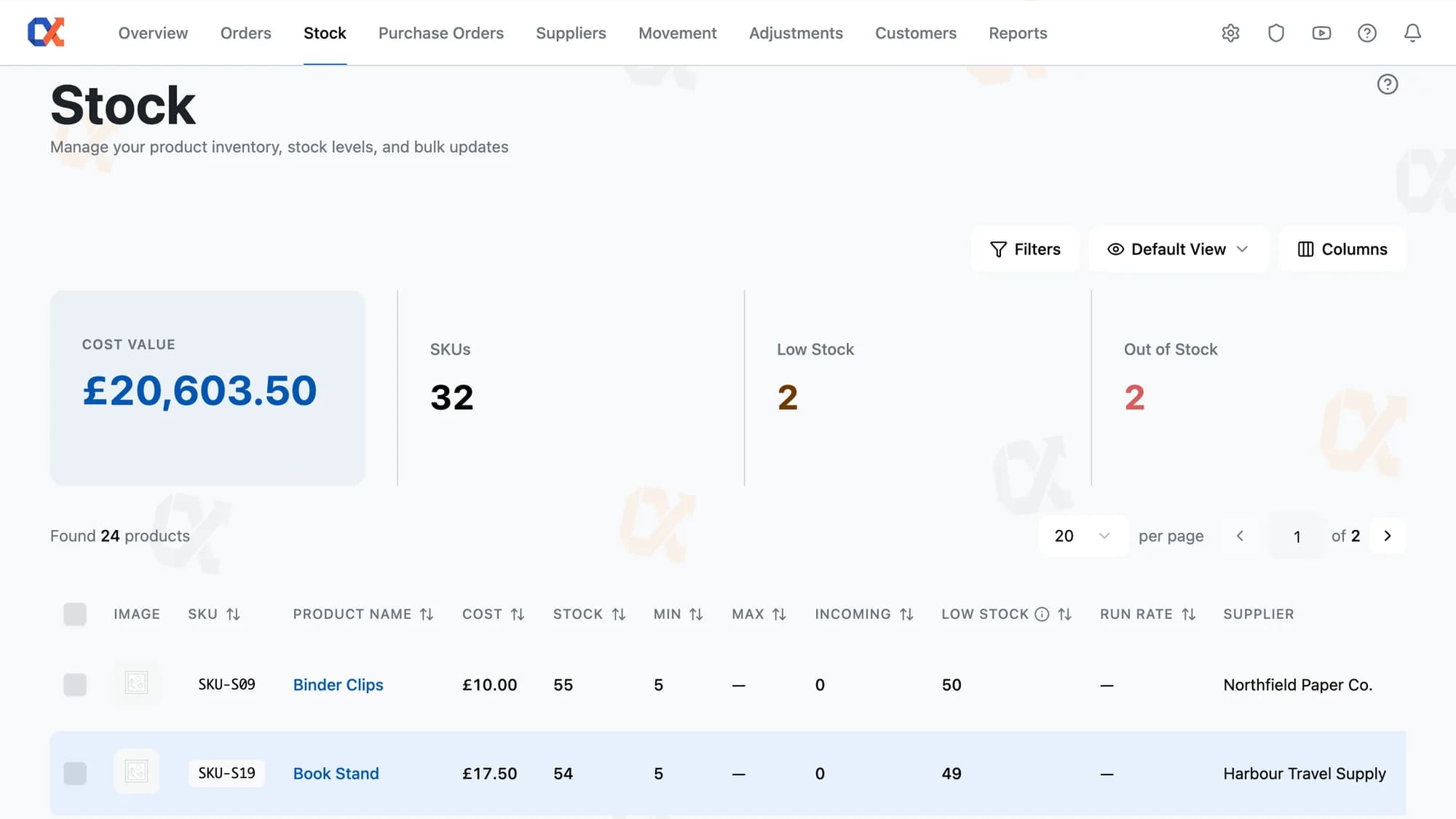
Knowing which products need ordering usually means opening multiple tabs, checking stock levels one by one, and hoping nothing slips through. The Low Stock column removes that process entirely. It shows the exact gap between current stock and your minimum threshold for every product, with negative values highlighted in red automatically. Sort by the column and your entire reorder list sorts itself.
Updating cost, stock limits, and supplier one row at a time across dozens of products wastes time and risks inconsistency. The bulk-edit panel removes that burden. Type a value into default cost, min stock, max stock, or run rate and every selected row updates instantly, with no separate apply step. Add a supplier once and it links to every product in the selection in a single action.
Managing multiple suppliers per product usually means a separate spreadsheet tab, updated by hand, with costs that drift the moment a supplier changes their price. In the per-product Suppliers section, each linked supplier carries its own Cost input and Tax % field, both editable inline. Add a new supplier through the searchable combobox, set the cost, and save. On save, the system removes any supplier you deleted and updates every remaining cost and tax figure in one pass.
Five editing surfaces inside the Stock list, routed automatically by the product in front of the operator.
Tick the checkboxes next to each product, or use the top-left checkbox to select every product on the filtered list, then click Quick Edit. Toggle the bulk-edit panel and type a value into any field. It propagates across every row immediately. Click Save to confirm.
Reorder before you run out. Low Stock and Out of Stock counts update on every page load.
Choose your ideal filter, sort, and column setup once. It becomes the default that opens every time.
Decide the right quantity to reorder. Incoming shows the total already en route across every active supplier PO.
Each product row shows the quantity required to restore full stock before a purchase order is drafted.
Every product row shows a green "Well Stocked" or red "Order Now!" badge, so nothing slips unnoticed.
Once all stock is PO-attributed, Default Cost reflects the price paid. No accidental overwrite possible.
The right editor for a product depends on how many attributes it has, so Inventory Alpha opens a different layout for each. A t-shirt with size and colour gets a two-dimensional matrix grid with metric tabs above it. A product with four attributes gets a scrollable flat list, editable per row via checkbox. The editor fits the product before the operator touches anything.
Manually switching editor views for each product type is the kind of low-level decision that compounds across a stock-take. Inventory Alpha removes it entirely: the Variation Sheet opens in the correct layout the moment the operator clicks the Eye icon, determined by how many attributes the product carries. One attribute, two, three, or four or more each resolve to a distinct, purpose-built view with no configuration required.
Stock comparison placeholder description.
No data migration, no separate dashboard. Inventory Alpha installs as a standard plugin and reads your existing WooCommerce orders and products.
Start free
Low Stock, Order Proposal, Incoming, Quick Edit, Variation Sheet, FIFO protection. Everything from one feature. There are eight more across Inventory Alpha. From £42.50 a month.