
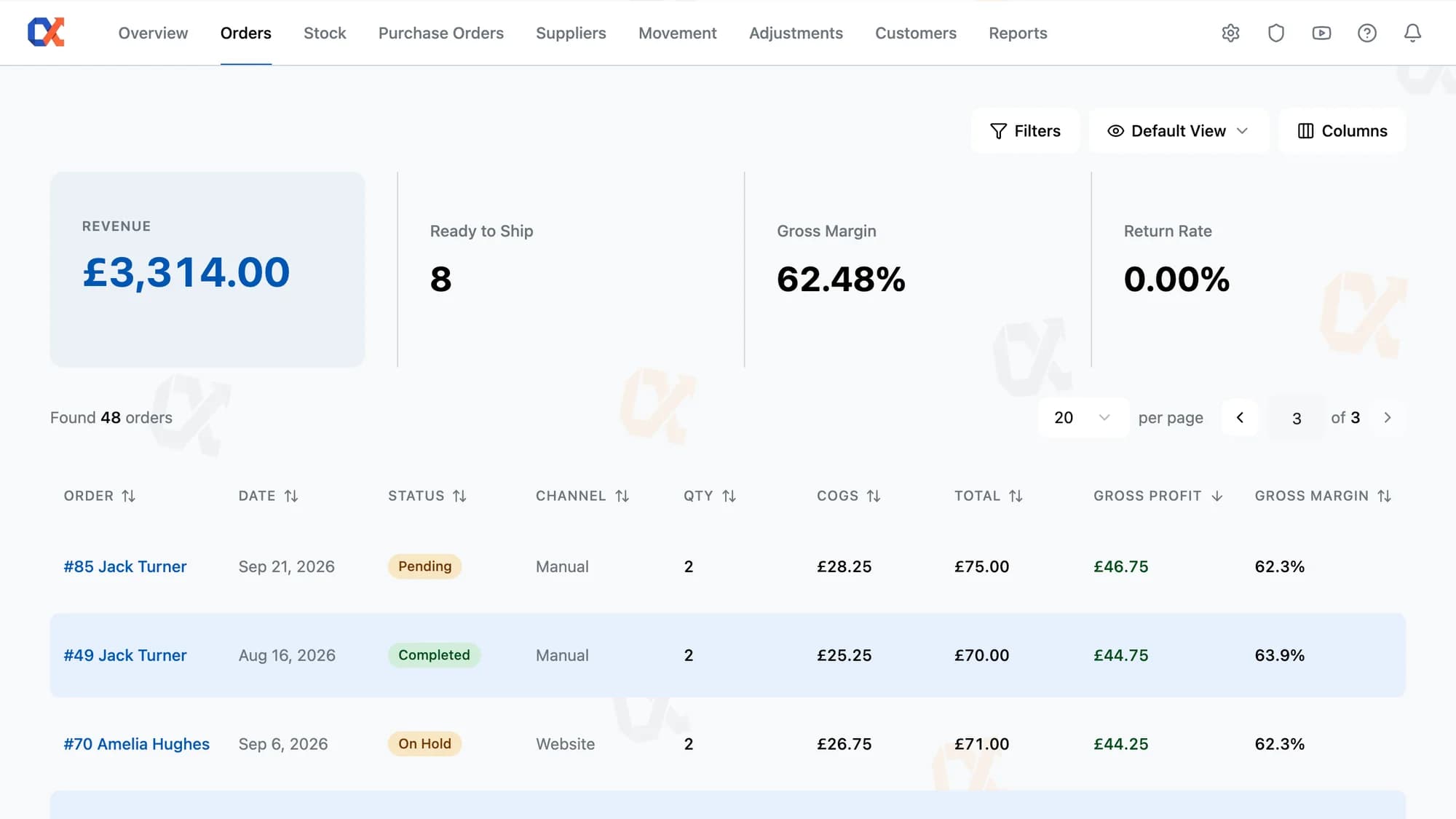
See which orders, channels, and SKUs actually made money. Every WooCommerce order carries real per-line and per-order margin, computed FIFO from purchase order receipts as inventory moves through the business.
Five things the orders page does on day one, before any setup or custom configuration.
Most stores estimate margin by averaging cost across all stock on hand. Inventory Alpha matches each sale to the actual purchase order receipt that brought that stock in, then uses that receipt's cost to calculate gross profit. The margin showing on the order is the margin the order really made, not an average that drifts every time a supplier price changes.
Most operators start the morning bouncing between a dashboard and the orders page to check four things: total volume, open orders, gross margin, and return rate. Inventory Alpha shows those four above the orders table itself. One read tells you whether today looks normal, then you start working the list.
Many tools sell margin reporting as a configurable add-on. Inventory Alpha treats it as part of the orders table. Order, channel, quantity, COGS, gross sales, gross profit, and status are populated for every order from day one, and they update on their own as the business moves.
Stores selling through more than one channel rarely know which one is actually profitable. Inventory Alpha tags every order with its source automatically. Orders coming from a marketplace plugin or in-store POS arrive already attributed. Orders that need a custom channel, like wholesale or a retail pop-up, can be defined manually. Reports turns the channel tag into a margin breakdown.
Two clicks turn a queue of open orders into a single SKU pick list. Tick the orders, hit Generate Pick List, and the warehouse gets one sheet sorted by SKU instead of a stack of order pages. Each line shows total quantity needed, so the picker walks the floor once and fills every box from the same trip.
Four screens that sit inside the orders list, from selection through to a printed packing sheet.
Click Generate Pick List on the Orders page to open the wizard. Inventory Alpha hides completed orders by default, so the open queue arrives ready to act on. Tick the orders going out and the button updates with the count before advancing.
Filters, columns, and per-page choices are stored, so all the lists open the way you left them.
A searchable combobox sits in the filter panel, sourced from every system and custom channel on the store.
Website, marketplace, and POS orders are tagged on creation, with custom channel attribution as an option.
Print packing sheets for every selected order with a single click.
Cost, gross profit, margin columns, and channel editing land on the WooCommerce order edit page natively.
Colour-coded status pills let the operator spot problem orders, refunds, and work in progress without reading text.
Open any WooCommerce order. The line items table shows Cost, Gross Profit, and Margin for each line, with Order COGS, Gross Profit, and Gross Margin totals below. The numbers are not estimates, and they are not averaged across stock on hand. They are the real margin that order produced. From there the operator can see which orders, which channels, and which SKUs are quietly losing money, and which are worth scaling.
Every unit on the shelf carries a record of the Purchase Order receipt that brought it in, and the cost paid on that receipt. When the unit ships, Inventory Alpha pulls that cost onto the order line it left on. Supplier prices change every quarter. The cost on the order is the cost actually paid for the stock that actually shipped, not a moving average that drifts with the next price increase.
What the orders screen gives you out of the box versus what you piece together in a spreadsheet.
No data migration, no separate dashboard. Inventory Alpha installs as a standard plugin and reads your existing WooCommerce orders and products.
Start free
Connect WooCommerce, receive one purchase order, and the next sale on the store carries real margin. From £42.50 a month, no credit card to start.